Stack It Like You Mean It: How to Layer HTV So Your Shirts Look Store-Bought
Photo: Adrian Bejan, CC0, via Wikimedia Commons
If you've ever peeled back a carrier sheet and watched the top layer of your design come up with it, you already know: layering HTV has rules. Break them and you get peeling edges, melted textures, and lumpy seams you can feel from across the room. Follow them, and suddenly your shirts look like something you'd pay $32 for at a boutique in Nashville.
The good news? The rules are short, learnable, and honestly kind of fun once they click.
First, the Golden Rule of Layering
Not all heat transfer vinyl plays well together. Before you cut anything, know your vinyl families:
- Standard HTV (smooth polyurethane): The workhorse. Layers beautifully, both on the bottom and the top of a stack.
- Glitter and sequin HTV: Texture city. These have a bumpy, raised surface, which means nothing should ever be pressed on top of them. They're a bottom-layer-only situation.
- Holographic and specialty metallics: Most can layer, but always check the manufacturer's notes. Some have coatings that don't love a second press.
- Puff and 3D HTV: Another texture vinyl. Like glitter, it goes on the bottom of the stack, never underneath another layer.
Quick mental shortcut: smooth goes anywhere, textured goes on the bottom. That one sentence will save you 90% of the heartache.
The Pressing Order Nobody Explains Clearly
Here's the part that trips up beginners: you don't press layer one, then layer two on top of the pressed layer one, then layer three, and so on. Every additional full-temperature press degrades the layers underneath.
Instead, work in tack presses and final presses:
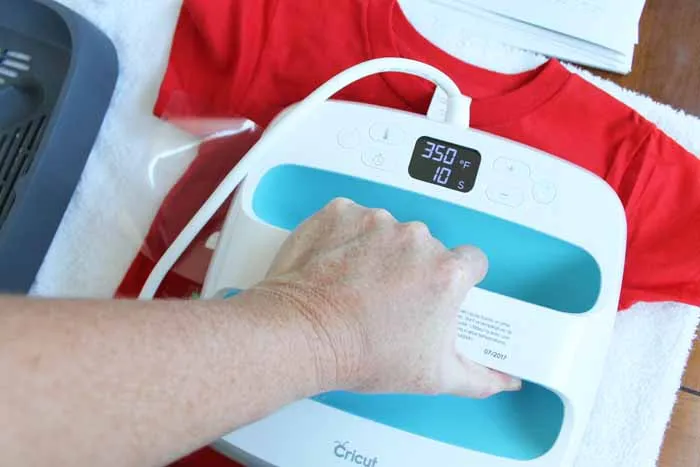
- Tack press the bottom layer at a lower temperature (around 275°F for most standard HTV) for 3–5 seconds. Just enough for it to grab the fabric — not fully cured.
- Place the next layer using its carrier sheet as your placement guide, and tack press again.
- Repeat until every layer is down.
- Final press the whole stack at full temperature (usually 300–315°F depending on your vinyl) for 10–15 seconds, covered with a Teflon sheet.
- Peel carriers per your vinyl's instructions — hot peel or cold peel, whichever your product calls for.
This approach means each layer only sees one full-temp press, so colors stay vibrant and edges stay crisp.
Registration Marks: Your Two-Second Insurance Policy
Cut a small triangle or notch into the corner of each layer's design — the same spot on every layer. Line up those notches when stacking, and your layers will land perfectly centered every time. Once the shirt is done, nobody sees them because they're tucked inside the design or hidden under the top layer.
If you're working with a design where a notch would show (like a simple circle monogram), use a T-square or the grid on your pressing mat instead, and measure your placement from the collar. Consistency beats cleverness.
Three Builds, From Easy to Ambitious
Build 1: The Two-Layer Monogram (Start Here)
A classic circle monogram with a name across the middle. Bottom layer in a smooth solid, top layer in a contrasting color or metallic.
- Cut the circle, tack press at 275°F for 4 seconds.
- Line up the name (registration notches on the circle's vertical axis help here), tack press.
- Final press the stack for 12 seconds at 305°F.
Total project time, including weeding: about 25 minutes. This is the build to practice your tack-press rhythm on.
Build 2: The Three-Layer Sports Mom Tee
Bottom layer of glitter (remember: bottom only), with a smooth number on top, and a small script word arched over the number.
- Tack the glitter layer first — it needs a touch more heat, around 285°F.
- Press the smooth number directly on top at the same temp.
- Add the script word last, then final press everything for 12 seconds.
The trick here is that glitter eats some adhesion, so give the final press the full recommended time and press firmly. A heat press beats an iron for glitter stacks — the even pressure matters.
Build 3: The Five-Layer Statement Design
This is where registration marks earn their keep. Think: a glitter base shape, a smooth color layer on top, a holo accent shape offset behind it, a bold word, and a tiny star or heart detail.
Order of operations:
- Glitter base — tack at 285°F.
- Holo offset accent — tack.
- Smooth main color layer — tack.
- Word and small detail — tack.
- Full stack final press at 305°F for 15 seconds.
Work slowly. Lay everything out on the shirt before pressing anything, take a phone photo of the arrangement, then press layer by layer. That photo is your cheat sheet if you get interrupted mid-build — and with five layers, you will get interrupted.
Troubleshooting: When It All Goes Sideways
Top layer peeling at the edges. Usually means the tack presses were too hot or too long, and the bottom layers are over-cured, so the top layer can't bond. Solution: drop your tack temp by 10–15 degrees and shorten to 3 seconds. Also check that you're pressing on a flat, firm surface — a wobbly ironing board is a silent edge-peeler.
Bulky, stiff seams where layers overlap. You're stacking too much in one spot. Three full layers directly on top of each other is the practical ceiling for wearability. If a design needs more, offset the layers or knock out the middle of the bottom shape (cut the center of the bottom layer away where the top layers sit). Nobody knows except your washing machine.
Layers shifting during placement. Leave the carrier sheet on the top layer while you tack press it. The sheet acts as both placement guide and a non-stick barrier, and you peel it after the tack.
Glitter shedding or looking flat. Glitter wants a firm, even final press and a full 24 hours before its first wash. Rush the wash cycle and you'll pay for it.
One Last Thing Before You Press
Always test your stack on a scrap of the actual fabric you're using — a $3 blank tee from the craft store, not your kid's favorite hoodie. Fabrics like tri-blends run cooler, and 100% cotton handles more heat. Two minutes of testing beats a ruined shirt every single time.
Once the rhythm clicks — tack, tack, tack, final press — you'll start seeing layered designs everywhere: state outlines with a word across them, holiday builds, team shirts for the whole booster club. And that's usually the moment a hobby quietly turns into a side hustle. But that's a post for another day.
Happy stacking.